
What you need
- An iPhone or iPad with iOS 15 or later.
- The free Riffgame app from the App Store.
- An idea. One sentence works; a longer description works better.
You don't need to sign up. You start as a guest. To keep your games, riffs and purchases if you change phones, link your Apple account with Sign in with Apple, or your Google account. You can do this later in the app.
How it works on iPhone
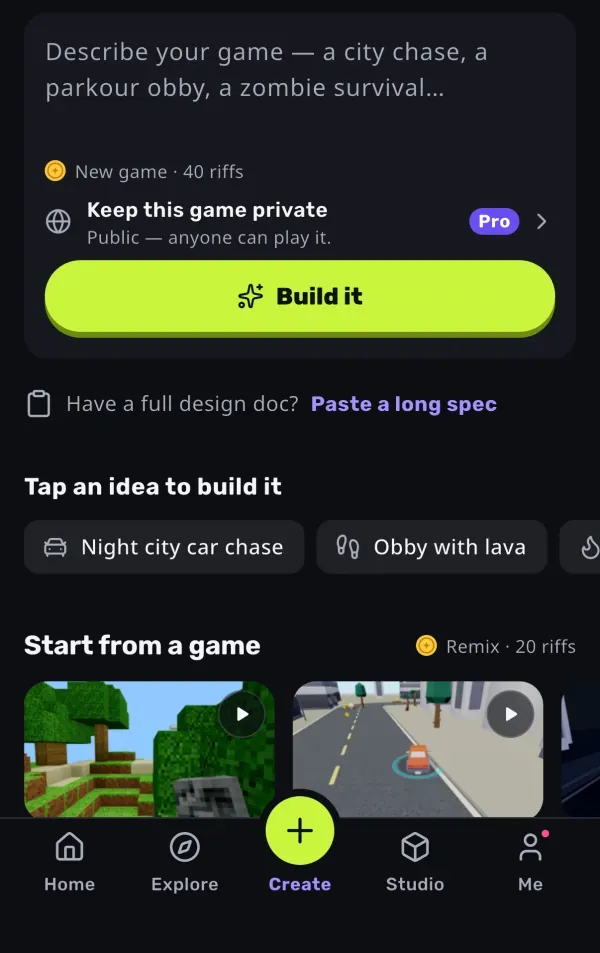
- Describe the game. On the Create tab, write what the player does, the goal, where it happens and how it looks. Write in your own language; the app is in 33 languages.
- Check the plan. The app shows a plan with a title, genre, goal, controls, camera and look. Tap anything to change it, then tap Build it.
- Let the AI build it. You see Plan, Build, Test, Polish and Publish as it works. You can leave the app; the build keeps going on Riffgame's servers.
- Play. The game opens inside the app with an on-screen joystick and buttons such as Jump or Boost.
- Change it by chatting. Type “make it night” or “add a boss” and the AI makes a new version. Older versions are kept.
- Share the link. Send it in Messages, WhatsApp or anywhere. Friends play in Safari, no app needed.
The full walkthrough, with real screens for each step, is in the step-by-step guide.
Example idea
Kart racing on a sunny cup circuit: 3 laps against 5 rival karts, hold drift through turns for a mini-turbo, item boxes with bananas and boosts, finish first to win the trophy.
The Riffgame team's idea for Turbo Kart Cup, one of the starter games you can play in your browser or remix in the app.
What you get
- A 3D game made for a phone screen, with touch controls. Keyboard controls work when someone plays it on a computer.
- A link on games.riffgame.com that plays in any modern browser, with no app or account.
- Versions: every change makes a new one, and you can still play the old ones.
- If you're 18 or older, your game is posted to Explore after an automatic check, where people can play it, like it and follow you. With Pro you can keep games private.
What it costs on iPhone
The app is free, has no ads, and playing is free. Making uses riffs: a new game is 40 riffs, a change 15 and a remix 20. New accounts get free riffs to start, once per device. If a build fails or you cancel it, your riffs come back.
After that, riffs come from a pack or Pro, paid through your App Store account. In the US, Pro is $9.99 a week for 200 riffs or $14.99 a month for 400 riffs, and you can cancel in your iPhone's subscription settings. Prices in other countries are shown in the app. Details are on the pricing page.
What it can't do
- It makes 3D, single-player games. No 2D games, videos or music.
- No online multiplayer, leaderboards or cloud saves inside games.
- It doesn't turn your game into its own App Store app. Games are shared by link.
- No casino or gambling games.
- The AI checks that the game loads on a phone-sized screen, but it doesn't play it for you. You're the playtester.
- Riffgame is for ages 13 and up. Teens' games are shared by link only.
Quick answers
- Is there an iPhone app that makes a game from a description?
- Yes. Riffgame for iPhone and iPad (iOS 15 or later) builds a playable 3D game from a few sentences you type. An AI agent writes and tests the game, usually in 10 to 20 minutes.
- Does it work on iPad?
- Yes. The same app runs on iPad with iPadOS 15 or later, and your games play on both.
- Do I need a Mac, Xcode or any code?
- No. Everything happens in the app on your iPhone or iPad. You write the idea in words and the AI writes the code.
- Is it free?
- The app is free to download, has no ads, and playing games is free. Making a game uses riffs: a new game is 40 riffs. New accounts get free riffs to start, once per device. The app shows the amount. See pricing.
- Does my game become its own App Store app?
- No. Riffgame makes 3D web games. Each one gets a link that plays in Safari or any modern browser, on a phone or a computer, with no download.
- Will I lose my games if I change iPhone?
- Not if you link your Apple account (or Google account) in the app. Your games, riffs and purchases then follow you to the new device.
Get Riffgame for iPhone and iPad